Simple Camera RAW processing.
Many of you asked me if/how I process my photos. First, I shoot in
RAW. Then I usally don´t do so much more than
correct the color and the white balance in the photos by using the RAW tool in Photoshop. Here, a simple and
short guide how I do.
1. I open the photo in the RAW editor/ Photoshop. This photo has an yellow cast.
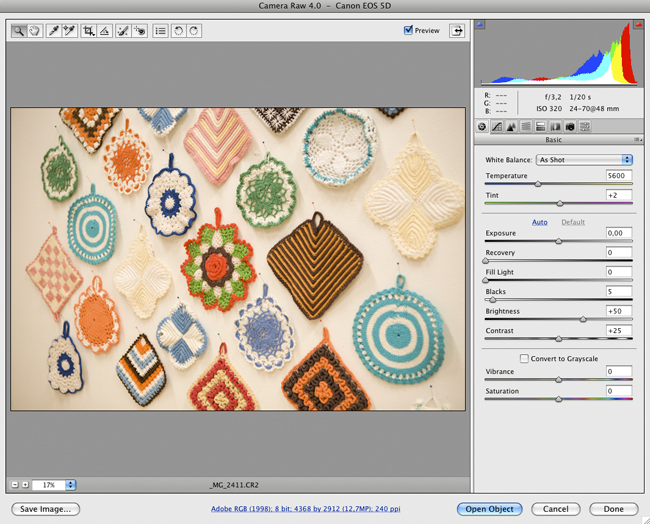
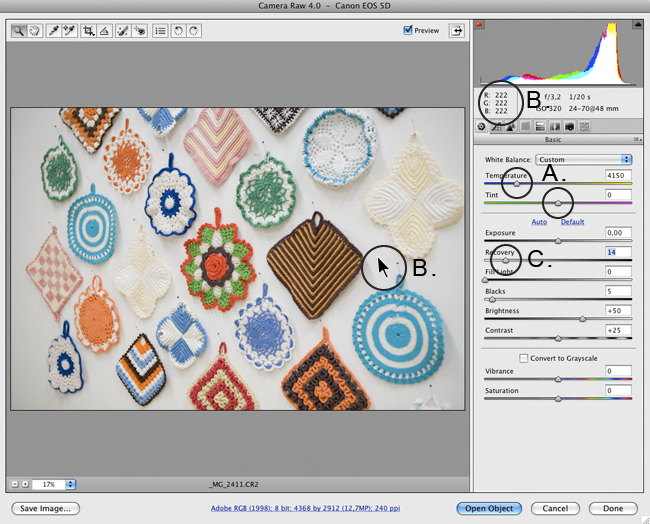
2 A. I adjust the color and correcting the white balance by changing "Temperature" and "Tint". (The goal is to
set the photo color similar to how the eye registered the color when shooting the photo.)
B. Adjusting the white in the photo to white by putting the mouse pointer at a known white surface (or a neutral grey
surface if you don´t have white in the photo) and check the RGB channels, the values should lie on the same percentages.
You affect the values it by changing Temperature and Tint.
C. I´ve also compensate the highlights in the photo by dragging the "Recovery" button.
A proper monitor calibration helps of course.
Advantages with shooting in RAW are for example:
- RAW tends to capture a richer tone of colours than Jpgs.
- You have more controls for exposure, details and colours with RAW.
What is Raw.
My camera.BUT, I´m don´t think you must color correct photos in general. Many photos are more charming just as they are,
with color casts or not. Sometimes I do more than color correct too, have to show you that another time.
Photo from
Fine Little Shop.--